
Every DevOps or Site Reliability Engineer has experienced the sudden panic of finding out a core enterprise tool, underlying Linux kernel, or Kubernetes distribution is reaching its End-of-Life (EOL) in a few weeks.
When running infrastructure on enterprise platforms like Red Hat Enterprise Linux (RHEL), OpenShift (OCP), Ansible Automation Platform (AAP), OpenShift AI, and Keycloak, staying compliant with support lifecycles isn’t just about getting patches—it’s critical for security compliance, API compatibility, and vendor SLAs.
Instead of manually navigating product documentation every quarter, we can query Red Hat’s official Product Life Cycles API directly from a CLI or an automated pipeline.
The Solution – A Zero-Dependency Bash Script
Instead of manually clicking through portal web pages, we can leverage standard Linux CLI utilities (curl, jq, column) to query Red Hat’s public lifecycle endpoint and print out formatted support windows.
What the script does under the hood:
- Pulls Live API Data: Querying
(https://access.redhat.com/product-life-cycles/api/v1/products) returns up-to-date lifecycle dates - Handles Schema Variability: Normalizes the different phase naming conventions used across various Red Hat products (e.g., standardizing
Full Supportand differingMaintenance Supporttiers). - Pipes clean data: Parses ISO timestamp data (
2026-10-01T00:00:00.000Z) down to easy-to-readYYYY-MM-DDstrings.
Why Automate This in Your CI/CD Pipeline?
Putting this script inside your Continuous Integration & Continuous Deployment (CI/CD) or GitOps pipeline shifts lifecycle governance to the left. Here is why automating lifecycle tracking is useful:
1. Proactive Compliance & Automated Policy Enforcement
In regulated environments (SOC2, ISO 27001, HIPAA), running unsupported software automatically breaches compliance standards.
- In a Pipeline: You can configure the script to calculate the remaining support window. If a base image (e.g., RHEL 9 or OCP 4.22) has less than 90 days of support remaining, the pipeline can emit a warning or fail a deployment check.
2. Prevention of “Version Drift” across Clusters and Nodes
Development, Staging, and Production environments often drift apart.
- Automating this script as a scheduled job (e.g., via GitHub Actions, GitLab CI, or Tekton) allows teams to receive weekly alerts (Slack, Teams, Email) detailing the precise support status of every container base image and platform host across all environments.
3. Smart Fleet Upgrade Scheduling
Large enterprises manage hundreds of OpenShift clusters and Ansible nodes. By automating lifecycle pulls, infrastructure teams can automatically feed version support dates into dashboards (like Grafana) or ticketing systems (like Jira).
- When a version enters Maintenance Support, a ticket is automatically generated to schedule the upgrade before it hits EOL.
4. Eliminates “Vendor Documentation Blindspots”
Release cadences change. Enterprise vendors frequently update EUS (Extended Update Support) timelines and patch end-dates. Querying the live API ensures your tooling always relies on the single source of truth rather than static internal documentation.
Practical Pipeline Implementation Examples
GitHub Actions Nightly Lifecycle Audit
Below is a snippet demonstrating how to run the lifecycle audit automatically in a GitHub Actions workflow and notify team channels:
name: Nightly Red Hat Support Audit

on:
  schedule:
    - cron: '0 8 * * 1' # Runs every Monday at 8 AM
  workflow_dispatch:

jobs:
  audit-lifecycles:
    runs-on: ubuntu-latest
    steps:
      - name: Checkout Code
        uses: actions/checkout@v4

      - name: Install dependencies
        run: sudo apt-get install -y jq curl bsdtar

      - name: Run Red Hat Lifecycle Audit
        run: |
          chmod +x ./rh_lifecycle_summary.sh
          ./rh_lifecycle_summary.sh > support_report.txt
          cat support_report.txt

      - name: Post to Slack on Failure/Warning
        if: failure()
        uses: slackapi/[email protected]
        with:
          payload: |
            {
              "text": " Red Hat Product Support Audit Alert! One or more platform components require immediate review."
            }
        env:
          SLACK_WEBHOOK_URL: ${{ secrets.SLACK_WEBHOOK_URL }}
Here’s the rh_lifecycle_summary.sh script that I am utilizing,
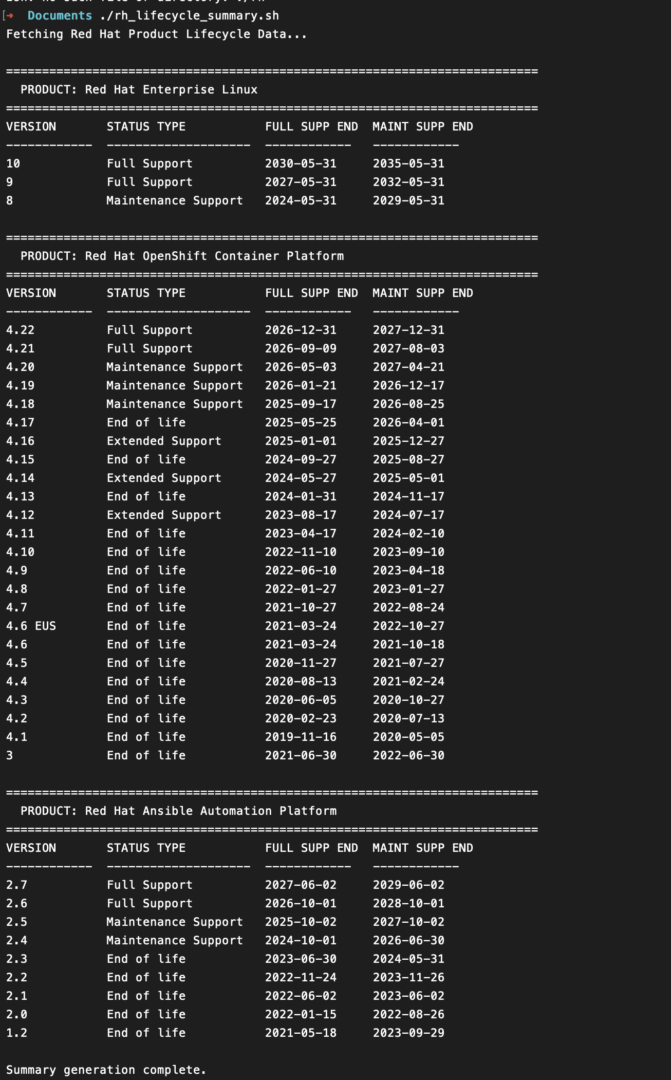
rh_lifecycle_summary.sh bash script and preview image
#!/usr/bin/env bash
#
# rh_lifecycle_summary.sh
# Fetches latest Red Hat Product Life Cycle JSON data for Core Platforms, AI,
# Middleware, Identity Management, and Automation products.

set -euo pipefail

# Target Red Hat official API product names
PRODUCTS=(
    "Red Hat Enterprise Linux"
    "Red Hat OpenShift Container Platform"
    "Red Hat OpenShift AI Self-Managed"
    "Red Hat Ansible Automation Platform"
    "Red Hat build of Keycloak"
    "Red Hat Single Sign-On"
    "Red Hat JBoss Enterprise Application Platform"
)

# Red Hat Life Cycle API Base URL
API_URL="https://access.redhat.com/product-life-cycles/api/v1/products"

fetch_and_parse() {
    local product_name="$1"

    # URL encode product name safely using jq
    local encoded_name
    encoded_name=$(jq -rn --arg x "$product_name" '$x|@uri')

    # Fetch lifecycle JSON payload
    local json_response
    json_response=$(curl -sSL "${API_URL}?name=${encoded_name}")

    # Guard check: Ensure product payload exists
    if [[ $(echo "$json_response" | jq '.data // [] | length') -eq 0 ]]; then
        echo -e "\n[!] Warning: No API entry found for '${product_name}'."
        return 0
    fi

    echo -e "\n=========================================================================="
    echo -e "  PRODUCT: ${product_name}"
    echo -e "=========================================================================="

    # Process payload into clean tabular format
    local formatted_output
    formatted_output=$(echo "$json_response" | jq -r '
      # Print Table Header
      "VERSION\tSTATUS TYPE\tFULL SUPP END\tMAINT SUPP END",
      "------------\t--------------------\t------------\t------------",

      # Iterate over all version entries
      (.data[0].versions[]? |
        .name as $ver |
        .type as $type |

        # 1. Extract Full Support End Date
        (
          [.phases[]? | select(.name == "Full support" or .name == "Full Support Phase" or .name == "Full Support") | .end_date]
          | first // "N/A"
        ) as $full_end |
        (if $full_end != "N/A" and $full_end != null and $full_end != "" then $full_end[0:10] else "N/A" end) as $full_str |

        # 2. Extract Maintenance Support End Date
        (
          [.phases[]? | select(.name | test("Maintenance")) | .end_date]
          | last // "N/A"
        ) as $maint_end |
        (if $maint_end != "N/A" and $maint_end != null and $maint_end != "" then $maint_end[0:10] else "N/A" end) as $maint_str |

        [$ver, $type, $full_str, $maint_str] | @tsv
      )
    ')

    # Format output columns dynamically
    if command -v column &>/dev/null; then
        echo "$formatted_output" | column -t -s $'\t'
    else
        echo "$formatted_output"
    fi
}

main() {
    echo "Fetching Red Hat Product Lifecycle Data..."
    for product in "${PRODUCTS[@]}"; do
        fetch_and_parse "$product"
    done
    echo -e "\nSummary generation complete."
}

main
Take Control of Infrastructure Technical Debt
Upgrades are rarely fun, but emergency upgrades on an EOL system are infinitely worse. By automating API-driven support tracking, platform engineering teams transition from a reactive crisis state to a predictable, automated lifecycle strategy.
